YY Game

Opening Night

  1. Home
  2. Download
Get Your Ticket

Download the YY Game APK

A 48 MB native Android build that installs in under a minute, opens in three seconds and runs comfortably on a phone with 2 GB of RAM. iPhone, iPad and desktop players get the same account, the same wallet and the same 500+ titles through the instant-play web build — nothing to install.

  • 48 MB file size
  • v4.2 latest version
  • Android 6.0+ supported
  • Free to download
  • ₹10,000 welcome bonus
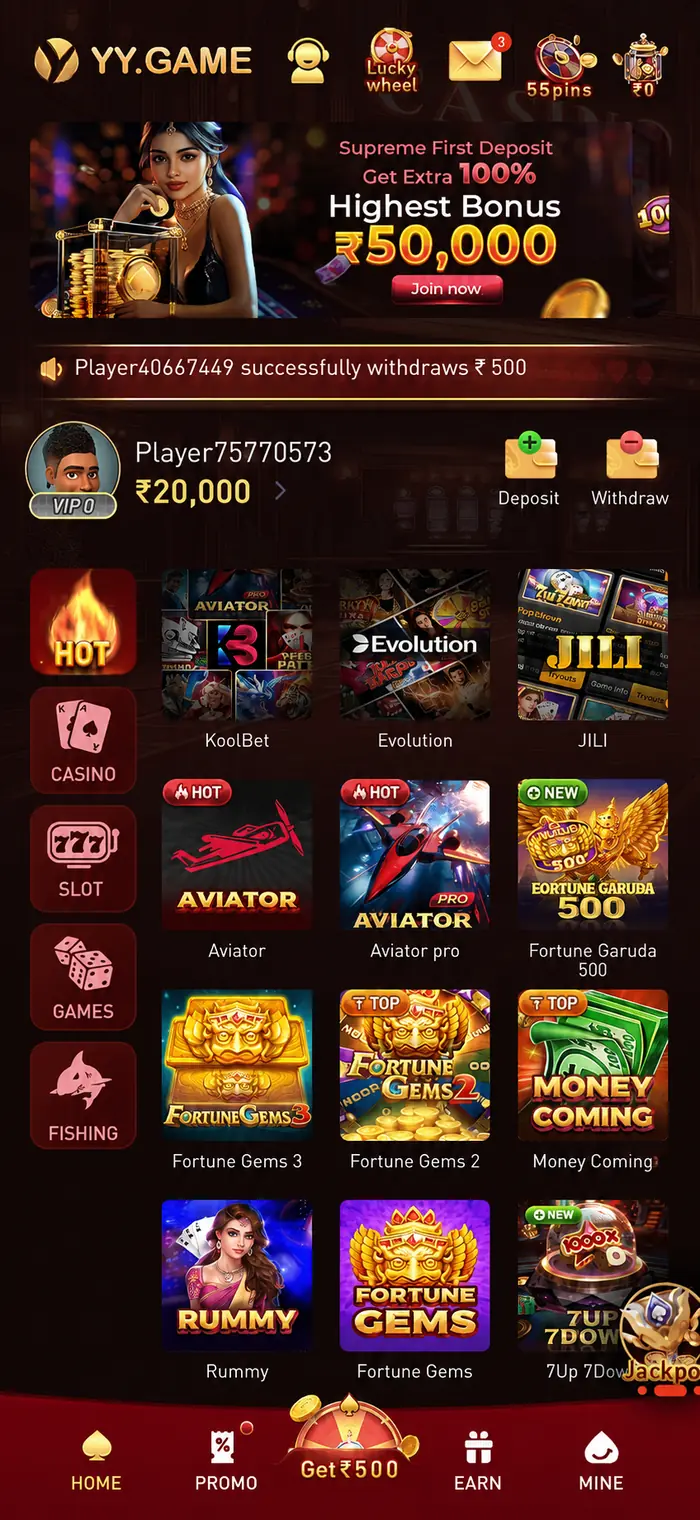
The YY Game app installed on an Android phone, showing the bonus banner, category rail and featured games
48 MBinstalls in ~50 seconds
Signed & safeverified certificate
4.8 / 518,000+ members
Six Ticket Stubs

Install the YY New App in Four Minutes

Written for a first-time Android installer. If you have installed an APK before, steps one and three are the only ones you need.

Tap Download and save the APK

Use any Download for Android button on this site. Your browser will ask you to confirm the download — accept it. The file is about 48 MB and typically takes 40 to 60 seconds on a normal 4G connection, or a few seconds on Wi-Fi.

Tip: if Chrome warns that "this type of file can harm your device", that is a generic notice shown for every APK, not a detection. Choose Download anyway.

Allow installs from your browser

Android blocks installs from outside the Play Store until you permit them, once, per app. Go to Settings → Apps → Special access → Install unknown apps, pick the browser you downloaded with (usually Chrome) and turn on Allow from this source.

Why is this needed? Google restricts real-money gaming apps on the Play Store in India, so every platform in this category is distributed as a direct APK. You only grant this once.

Open the file and install

Pull down your notification shade and tap the completed download, or find it in Files → Downloads. Tap Install, wait a few seconds, then tap Open. The YY Game icon will be on your home screen when you are done.

Play Protect prompt? Tapping Install anyway is expected for any non-Play-Store app. Our releases are signed with a consistent certificate you can verify in app info.

Register with your mobile number

Open the app and tap Register. Enter your mobile number, choose a password and confirm the six-digit OTP. That is the entire sign-up — no email verification, no forms, no waiting for approval. If you have a referral code, enter it on this screen.

OTP not arriving? Check your network signal, wait the full 60 seconds before requesting a resend, and confirm the number has no country code duplication.

Deposit ₹100 and claim ₹10,000

Tap Deposit, pick UPI, Paytm, PhonePe, Google Pay or net banking, and add ₹100 or more. Funds credit instantly and the ₹10,000 welcome bonus is applied on the same screen. There is no promo code to enter and no support ticket to raise.

Deposit pending? UPI occasionally takes a minute at peak. If it has not credited after five, send the UTR number to the Help Desk on Telegram and it will be traced immediately.

Set your limits, then play

Before your first spin, open Settings → Responsible Gaming and set a deposit cap you are comfortable with. It applies instantly. Then pick any of the 500+ titles and start at a stake that fits your budget — most slots and arcade games begin at ₹1.

Withdrawing later: minimum ₹200, first payout each day free, UPI settles in around three minutes once your one-time KYC is complete.
What You Are Installing

The App, Screen by Screen

Real captures from the current release — lobby, wallet, rewards, VIP club and referral tools.

YY Game app screenshot — app home screen with the deposit bonus banner, category rail and featured game grid
Home Lobby

Featured titles, hot tags and a live winners feed.

YY Game app screenshot — deposit screen with preset rupee amounts, first-deposit bonus banner and payment tips
Deposit

Preset amounts, first-deposit bonus and clear payment tips.

YY Game app screenshot — withdrawal screen showing cash balance, withdrawal amounts, daily limits and the Withdraw button
Withdrawal

Cash balance, withdrawal amounts and daily limits.

YY Game app screenshot — rewards screen showing team level, bet rebate, deposit rebate and total invitation rewards
My Rewards

Team level, bet rebate, deposit rebate and referral totals.

YY Game app screenshot — lucky spin wheel with a free spin, live cash-out balance and personal invitation code
Lucky Spin

A free daily spin with cash and bonus segments.

YY Game app screenshot — promotions page listing the first-deposit bonus, Piggy Bank, agent rewards and ₹500 offers
Promotions

Every live offer with its full terms attached.

YY Game app screenshot — club rewards screen with club stars, rebate tiers and friend-invite sharing options
Club & Rebates

Club stars, rebate tiers and one-tap friend invites.

YY Game app screenshot — profile menu showing VIP tier, balance details, live support, gifts and account settings
Profile

VIP tier, balance details, live support and gifts.

Device Compatibility

Will It Run on Your Phone?

Almost certainly. The app was built for the Indian mid-range market, not for flagship hardware. Here is the honest specification.

Android — native APK

Recommended
  • Minimum OSAndroid 6.0 (Marshmallow)
  • Recommended OSAndroid 10 or newer
  • RAM2 GB minimum · 4 GB ideal
  • Free storage150 MB after install
  • Download size48 MB
  • Architecturearm64-v8a, armeabi-v7a
  • Connection3G works · 4G / Wi-Fi ideal
  • Data use~40–60 MB per hour
  • UpdatesIn-app, automatic prompt

iOS, iPadOS & Desktop — instant play

No install needed
  • iPhone / iPadiOS 12+ · Safari or Chrome
  • WindowsChrome, Edge, Firefox
  • macOSSafari, Chrome, Firefox
  • Install requiredNone — runs in-browser
  • Home-screen shortcutSafari → Share → Add to Home
  • AccountSame login and wallet
  • Game catalogueIdentical — all 500+ titles
  • Push notificationsAndroid app only
  • Screen supportPortrait and landscape

Battery & heat

Slots, cards and arcade titles are light on the processor. Live-dealer streams use the most power — expect roughly 12% battery per hour of live play on a mid-range handset.

Data usage

Around 40–60 MB per hour for reels and cards. Live-dealer video is heavier at roughly 250 MB per hour on high quality; drop the stream quality in the table settings to cut that by half.

Multiple devices

One account works across your phone, tablet and computer. You will be signed out of the older session when you log in elsewhere, which is a deliberate security measure.

Download Safely

How to Tell a Genuine APK from a Fake

Popular gaming apps attract counterfeit builds, and a modified APK can capture your login or payment details. Protecting yourself takes about thirty seconds and three habits.

1. Only use official sources

Download from this site or from a link posted in one of our two official Telegram channels — @bbxxyyz (Help Desk) or @yn_games (community). Never install an APK forwarded in a WhatsApp group, hosted on a file-sharing site, or attached to a message from someone you do not know.

2. Check the file size and version

The genuine build is approximately 48 MB at version 4.2. A file that is dramatically smaller or larger has been repackaged. You can confirm the installed version under Settings → About inside the app.

3. Updates never require uninstalling

Because every release is signed with the same certificate, genuine updates install straight over the existing app. If an "update" instructs you to uninstall first, it is not ours — stop, and check with the Help Desk before proceeding.

“No YY Game staff member will ever ask for your password, OTP or UPI PIN — not in a chat, not on a call, not in either Telegram channel. Anyone who does is impersonating us.”

— YY Game Security Desk

Release Details

YY Game APK release information
App nameYY Game
Latest version4.2
File size≈ 48 MB
CategoryGames / Casino
RequiresAndroid 6.0+
PriceFree
LanguagesEnglish, Hindi
CurrencyINR (₹)
RegionIndia
Age rating18+
If Something Goes Wrong

Install & Login Troubleshooting

The issues our Help Desk actually sees, with the fix that usually resolves them.

This almost always means one of three things:

  • An older copy is still present. Uninstall any previous YY Game build, restart the phone, then install again.
  • Storage is full. The installer needs roughly 150 MB free beyond the download itself. Clear some space and retry.
  • The download was interrupted. A partial APK fails at the final step. Delete the file and download it again on a stable connection.

You have not yet granted install permission to the browser you downloaded with. Open Settings → Apps → Special access → Install unknown apps, select that browser, and enable Allow from this source. On some manufacturer skins the path is Settings → Security → Install unknown apps.

If Play Protect shows a warning after that, choose Install anyway — the warning appears for every app distributed outside the Play Store, regardless of its contents.

Confirm you have signal, and that the number was entered without a duplicated country code (+91 should not appear twice). Wait the full 60 seconds before requesting a resend — repeated requests can queue behind each other.

Some DND settings and third-party SMS-filter apps intercept transactional messages; check your spam or blocked folder. If nothing arrives after two attempts, message the Help Desk on Telegram with your registered number and it will be resent manually.

Games stream their assets on first launch, so a weak connection shows an endless loading spinner. Switch between Wi-Fi and mobile data to test, then force-close and reopen the app.

If a single title fails while others work, clear the app cache under Settings → Apps → YY Game → Storage → Clear cache. This does not affect your account, balance or history. If the problem persists across every game, the provider may be running scheduled maintenance — the community channel posts notices when that happens.

UPI occasionally takes a minute or two at peak load. If the money has left your account but has not appeared after five minutes, do not repeat the payment. Take the UTR / reference number from your banking app and send it to the Help Desk on Telegram with your registered mobile number.

Traced deposits are almost always resolved within the hour. Duplicate payments are refundable but take considerably longer, so it is worth waiting rather than retrying.

The warnings you see are generic Android notices shown for any app installed outside the Play Store — they are not a scan result and do not indicate that anything was detected. Google restricts real-money gaming apps in India, which is why direct APK distribution is standard for this entire category.

What matters is the source. Take the file from this site or an official Telegram channel, confirm it is roughly 48 MB, and never install a build forwarded to you privately.

Yes — install it on as many devices as you like and log in with the same number. For security, only one session stays active at a time, so signing in on a second device ends the first session. Your balance, bonus progress and history are stored server-side and follow you across devices.

The app prompts you when a new build is available and handles the update itself. If you would rather update manually, download the current APK from this page and install it over the existing app — your account and balance are unaffected because everything is stored server-side.

Genuine updates never require you to uninstall first. If one asks you to, stop and verify with the Help Desk.

Doors Open

Your Ticket Is Waiting

Four minutes from here to your first spin, with ₹10,000 already in the wallet when you arrive.